There is no "read-to-me" narration available with this ebook, but that is okay. This is a book better suited to older readers. Brooklyn and I enjoyed it together. Although Autumn initially sat down with us, she quickly wandered away. Read it with your children, or give it to children old enough to read it themselves. One thing I wish the app did have was a way to navigate through to a certain part a little bit more quickly... It is maddening to try to re-read a particular page in the middle of the book without a page guide to let you jump in to the middle. But that minor quibble aside, this is a beautiful, well-constructed and thought provoking ebook that I expect my kids to grow into.
Saturday, March 29, 2014
Love
There is no "read-to-me" narration available with this ebook, but that is okay. This is a book better suited to older readers. Brooklyn and I enjoyed it together. Although Autumn initially sat down with us, she quickly wandered away. Read it with your children, or give it to children old enough to read it themselves. One thing I wish the app did have was a way to navigate through to a certain part a little bit more quickly... It is maddening to try to re-read a particular page in the middle of the book without a page guide to let you jump in to the middle. But that minor quibble aside, this is a beautiful, well-constructed and thought provoking ebook that I expect my kids to grow into.
Sunday, March 16, 2014
Hocus Pocus Alfie Atkins
Alfie Atkins is building a treehouse so that he can reach a gift that his imaginary friend, Malcolm, left for him on a cloud. You can help him by finding/earning boards for him. If this sounds weird to you, that's okay--it struck me as a little odd too. Hocus Pocus Alfie Atkins is based on the movie version of a beloved Swedish book series. I'm guessing the whole premise might have made more sense if we had already read the books. But that's okay--a little oddness never hurt anyone. And, of course, Brooklyn thought nothing of it anyway.
We downloaded the free version with limited content (which actually explains the premise better) and she was immediately smitten. Alfie is a lovable character, with lots of interesting friends, and there are nine or ten mini-games to play within this app. I did, in the end, shell out $3.99 for the full version of the app, because Brooklyn took me on a tour of the free version and showed me all the things she and Alfie do together and the things she wanted to do. She was passionate and focused, but more importantly, I was really impressed with her navigation skills: she was clicking all over that app, as if she had designed it... First to the game to show me how to play, then out of the game to see what reward she had earned. Back to the treehouse to see how to build/decorate with her reward, and then over to the park where Alfie was singing and dancing with his friends. When I tried to do it later, it took me AGES to figure it all out.
I see multiple benefits to letting my daughters play with an app like this: first, as just mentioned, there is their technological know-how and ease with computers. There is no realm of society or job market in which my girls won't need computer skills. As she was playing today, I could see her learning. For example, she kept asking me where specific letters are: "Mom! Where's the 'P'?!" I didn't need to think about it: "Top row, on the right." "Where's the 'V'?" "Bottom row, middle..." Very soon--much sooner than I needed it--she is going to need at least that level of digital expertise. The more she plays around, the more comfortable she gets.
Another thing I like about this app are the mini-games offered. There are a nice variety of skills practiced in each of these, from memory to fine-motor to rhythm. Some of the games are open-ended and encourage creativity, like Dance, in which Alfie and his friends move to either a pre-recorded rhythm or to one you provide. Brooklyn, naturally, chose to sing a song of her own creating into the iPad microphone. Treasure Hunt is a concentration game in which you are shown where some bits of treasure and some trash ("rubbish," in the app's British-English) is buried and then it is covered up again. You take turns, playing against either one of Alfie's friends or one of your real friends, trying to find the treasure again. Cook is just like any of the ever-popular food preparation apps that kids this age find so fascinating... Alfie is making stew for his dad. You choose the ingredients, chop them up, add them to the pot, season it just right (careful not to add the insects, or Dad will pronounce it, "... Interesting...") and then ladle it into bowls without spilling any on the table.
The pace and narration of Hocus Pocus Alfie Atkins is just right. When you get something wrong, he matter-of-factly tells you so, without talking down or saying anything cutesy. If you spill some stew onto the table while ladling it into the bowls, Dad's voice says, "Whoops, you spilled a little. Careful, now!" You can do any of the games over again, or you always have the choice to move on to a different game.
This is a nice app for preschoolers and kindergartners. I think mine will come back to it again and again. Best of all, there is a reset button in the settings, so I can tear down the treehouse once Brooklyn gets to the secret gift in the sky. Then she (or perhaps her sister) can start all over again!
Wednesday, December 4, 2013
Endless Alphabet
This app drives me crazy. It has recently become my two-year-old's go-to app; it wins awards left and right; and friends recommend it to me all the time. And yet, from a literacy point of view, it's pretty terrible. There is so much to like about it, that I feel bad criticizing the flaws in the literacy learning. When I talk to other friends with two-year-olds who adore Endless Alphabet as much as my daughter does, it feels like splitting hairs to point out that in many instances the letters make sounds they don't actually make in the context of that word. Or that "gargantuan" is a ridiculous vocabulary word for our toddlers to be practicing. Because what does it matter, really, when we've found an app that holds the two-year-olds' attention spans for longer than five minutes at a stretch? And one that encourages the kids to practice letter names and learn new words at the same time? It's gold... right?
After the word is built, the monsters return and act out the meaning of the word. Some of the words strike me as more interesting / appropriate than others for the youngest learners, in terms of the vocabulary learning that toddlers should be doing, but Autumn's decision-making process is always inscrutable.
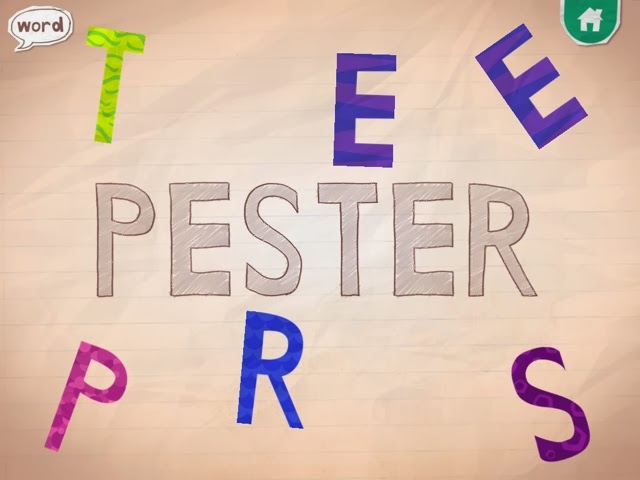
Endless Alphabet opens with a parade of adorable monsters playing musical instruments. You then choose from a variety of continuously-updated words and a monster scatters the letters from the word. Your job is to put the letters back into their proper place. As you drag each letter into place, the letter says its most common sound (although NOT necessarily the sound it makes within the word; for example, the letter e always says "eh," even though in reality it is silent in many of the words, such as "dye"). Once clicked into place, the letter says its name. Every time Autumn plays with this app she editorializes as well: /a/, /a/, /a/, A "... for Autumn!" buh, buh, buh, B ".... for Brooklyn, and there are two of them!" " V ... Vivian starts with V. My friend, Vivian! She starts with V!"
Please note that in the letter A example above, the word could have been "musician." Yes, Autumn has learned that the letter A is for Autumn. And the reading teacher in me cringes when she says, aa, aa, Autumn. But that part is not the app developers' fault; after all, they don't know my daughter's name. They do, however, know their own words. And the sound /a/ (as in "apple") is very hard to hear in the word "musician." If they had consulted a literacy expert in the development of this app, they would have been told that the letters should make the sounds that they make within the actual word.
Another problem is the pronunciation of some of the sounds themselves. The first, most essential, rule in making a phonics app is to make sure that there is no distortion in the pronunciation of the stop sounds (letters like B and D, which have sounds you can only say quickly and then you have to stop. As opposed to M and N, which are continuants: you can say their sounds as long as you have the breath to hold it.) In Endless Alphabet, monster voices make all of the sounds. Which is cute, but the letter sounds come out in deep, guttural voices, sounding like "BUH, BUH, BUH." Worse, if you hold your finger down on the letter B, the "uh" sound gets stretched out even further, so that it sounds like "buuuuuuh." This is nothing like what the letter sounds like within the word: NIBUUUUUUHLE?
The companion app to Endless Alphabet is Endless Reader. That one looks and feels almost exactly the same as Endless ABC (and is made by the same folks), but the words are smaller. Some recent words I saw include "ball," "cake" and "eat," and they get used in a sentence during the definition portion. Originator calls these words "sight words," even though they are phonetically regular, and clearly thinks that they are teaching kids to read with this app. Of course, this app has all the same problems outlined above (the A in "eat" does not make an /a/ sound!) They have recently started charging for many of the words in the app, and I say good riddance to those words. My kids know they are not allowed to touch anything with a lock on it. These apps have so much potential. It is a pity that they did not consult with a literacy expert.
It is probably worth noting here that I am the only person on the Internet critizing these apps. Do a quick Google search of the reviews of Endless Alphabet and you will see only raves... "Wit and whimsy," "charming," and "surprisingly sophisticated" are just some of the words that pop up. And everyone's kids are apparently addicted. Resistance is futile. Those darn monsters are just too cute.
Sunday, November 24, 2013
Sky Fish Phonics
Sky Fish Phonics is the first phonics app both my kindergartner and I love. It feels like a fast-paced video game with sharks to dodge and CVC words to decode. First you choose a fish to represent yourself, then you begin a journey through the sky, shooting from pod to pod avoiding the poisonous sharks. As you go you have the opportunity to collect new costumes and to rack up points by collecting stars. Every so often you also have to answer a multiple choice phonics question to advance to the next pod. For example, change "jet" into "net." JET -> _ET with the choice of three letters you can click on to hear their sounds.
![]() |
| Costumes include shark, princess, cowboy, ninja, and more. |
![]() |
| An early level |
![]() |
| A middle level |
We love almost everything about this game. I think the practice with executive functions and dealing with frustrations is just as valuable for Brooklyn as the phonics work. I hope in the future that the app developer releases more advanced levels with blends and digraphs to decode and substitute.
Wednesday, September 25, 2013
Sago Mini Bug Builder
I thought I was downloading this app for my little one, but
as it turns out, both girls absolutely love the Sago Mini Bug Builder. Part of
its appeal is its simplicity. Open the app and a cute pink bug lays a
multi-colored egg that hatches with the tap of a finger. A geometric shape
appears (Autumn says in delight, every time, “What is THAT?!”) that you
decorate with the swipe of a finger to a color palette. Stripes, polka dots, swirls… anything
goes. Click the checkmark when you’ve finished your masterpiece, and watch your
bug come to life.
Choose a hat to add to your bug, feed it some snacks, wipe
the crumbs off its face, then snap a picture of your creation before she lays
another egg to start the process all over again.
So what is it that my kids love so much about this app?
Well, they both love to color, and this app certainly fulfills their creative
yearning. They’re delighted with the way every bug comes out. And they’re just
as delighted to begin a new one.
As for me, it would be hard not to be charmed by the bugs’
silly smiles and rainbow hues. I’ve also heard myself introducing some novel
vocabulary words as the girls have asked my opinion on which hat to put on
their bug (“The fez, definitely!”) or if I think the stripes look better this
way or that way (“Why not draw some horizontal stripes and some vertical ones?”)
So the Bug Builder may not be the most educational app around, but it’s far
from the worst. I’m not sure how much longer this app will be free, but for now
it feels like a great deal.
Sunday, September 15, 2013
Dr. Panda
Are the Dr. Panda games new, or
am I just late to the party? It seems that every time I turn around, one has
gone free. And there was a time not so long ago when my youngest was obsessed
with watching the San Diego zoo’s live panda cam (http://www.sandiegozoo.org/pandacam/),
so I still get excited for her whenever I see anything panda-related. At this
point, we’ve got Dr. Panda’s Handyman, Dr. Panda’s Beauty Salon, Dr. Panda’s
Restaurant, and Dr. Panda’s Hospital.
Of course, it turns out the panda in these apps is purely
gratuitous. He pops up to congratulate you for a successful repair in Dr.
Panda’s Handyman, or to greet customers in the beauty salon. But there is no
real need for a panda, per se, in any of these games. But that’s okay—all of
the characters are adorable in a big-eyed simply-drawn sort of way, and my
girls love them.
All of the Dr. Panda apps are role-playing games in which
you pretend to be a handyman, beautician, chef, or doctor. The handyman app is
particularly charming: in the giraffe family home, you get to use a jackhammer
to break up the remaining tile in
a broken floor, then spread glue, re-tile, and clean up the mess with a vacuum
cleaner. The polar bear family has a leaky shower—lower in a new tub, with the
use of a pulley system, then fix the broken pipes in the wall by fitting the
pieces into the puzzle. My favorite might be the fish tank that needs
assembling, populating, feeding, and then cleaning.
I like the problem-solving nature of Handyman. And there is
an element of creativity behind every Dr. Panda app—you get to make lots of
choices in how you handle situations, what color you paint the door, or which
wig you put on the pig, etc. Plus there are lots of nice little extras. In
between scenes in Handyman, you can visit the attic, where a friendly ghost and
bat live, and play a quick little sorting game to separate the screws, nuts,
and bolts on an assembly line. Sorting properly earns you stickers toward a
scene full of power tools. In sum, the apps are fun and don't seem to be a total waste of time... especially considering the price I paid.
Wednesday, August 21, 2013
Princess Fairy Tale Maker
Duck Duck Moose may well be our second-favorite app creator (after
Toca Boca!). For a long time, Autumn’s favorite app was Duck Duck Moose's Itsy
Bitsy Spider. Just lately though, Brooklyn has taken to fiddling with the Duck Duck Moose Princess Fairy Tale Maker. Whenever I hear classical music blasting
from the backseat of the van, I know she's creating a new scene. In fact, she
told me that the classical music score that accompanies the app is one of her
favorite things about it; she finds the music soothing.
There are three options on opening the Princess Fairy Tale
Maker: “fairy tales,” “coloring,” or “my drawings.” This is a bit misleading,
as the first two are options for you to create--in Fairy Tales, you use
stickers or a paint tool to draw on a scene, then have the option to record a
voiceover narration. Coloring is a similar scene on which you can use your
finger to fill in color, sparkles, or patterns. Any of the resulting scenes or
coloring pages end up saved in My Drawings and can then be rearranged in any
order to result in a story.
As always, when I purchased the app, I envisioned Brooklyn
creating whole stories with it. I thought she would meticulously create each
scene to build upon one another and then narrate a brilliantly-held together
tale to go with it. And maybe she would if I worked on the bestselling
hypothetical stories with her. But we don’t have the time. So I’ve had to
adjust my expectations some. Instead of stories she creates individual scenes. Each
one is new and creative. Sometimes she tells me stories to go along with the
scenes; she has yet to figure out how to record these stories, but that’s okay,
since they rarely make a whole lot of sense. A built-in writing prompt or two
from Duck Duck Moose might have helped point her in the right direction. But
hey--at least she enjoys the soothing music.
Subscribe to:
Posts (Atom)