Wednesday, December 4, 2013

Endless Alphabet

This app drives me crazy. It has recently become my two-year-old's go-to app; it wins awards left and right; and friends recommend it to me all the time. And yet, from a literacy point of view, it's pretty terrible. There is so much to like about it, that I feel bad criticizing the flaws in the literacy learning. When I talk to other friends with two-year-olds who adore Endless Alphabet as much as my daughter does, it feels like splitting hairs to point out that in many instances the letters make sounds they don't actually make in the context of that word. Or that "gargantuan" is a ridiculous vocabulary word for our toddlers to be practicing. Because what does it matter, really, when we've found an app that holds the two-year-olds' attention spans for longer than five minutes at a stretch? And one that encourages the kids to practice letter names and learn new words at the same time? It's gold... right?


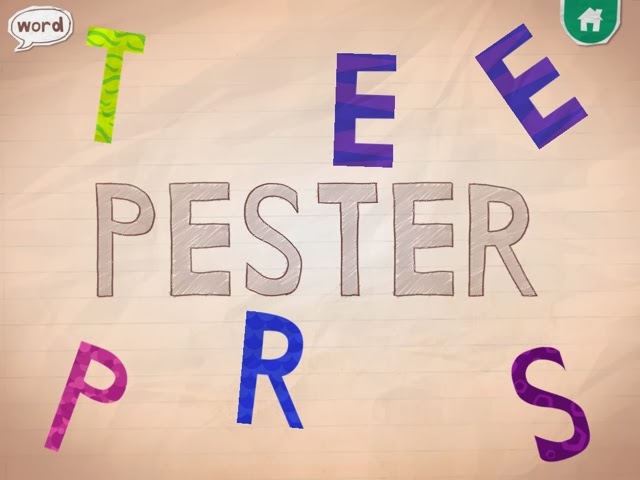
Endless Alphabet opens with a parade of adorable monsters playing musical instruments. You then choose from a variety of continuously-updated words and a monster scatters the letters from the word. Your job is to put the letters back into their proper place. As you drag each letter into place, the letter says its most common sound (although NOT necessarily the sound it makes within the word; for example, the letter e always says "eh," even though in reality it is silent in many of the words, such as "dye"). Once clicked into place, the letter says its name. Every time Autumn plays with this app she editorializes as well: /a/, /a/, /a/, A "... for Autumn!"  buh, buh, buh, B ".... for Brooklyn, and there are two of them!" " V ... Vivian starts with V. My friend, Vivian! She starts with V!"  


Please note that in the letter A example above, the word could have been "musician." Yes, Autumn has learned that the letter A is for Autumn. And the reading teacher in me cringes when she says, aa, aa, Autumn. But that part is not the app developers' fault; after all, they don't know my daughter's name. They do, however, know their own words. And the sound /a/ (as in "apple") is very hard to hear in the word "musician." If they had consulted a literacy expert in the development of this app, they would have been told that the letters should make the sounds that they make within the actual word. 

Another problem is the pronunciation of some of the sounds themselves. The first, most essential, rule in making a phonics app is to make sure that there is no distortion in the pronunciation of the stop sounds (letters like B and D, which have sounds you can only say quickly and then you have to stop. As opposed to M and N, which are continuants: you can say their sounds as long as you have the breath to hold it.) In Endless Alphabet, monster voices make all of the sounds. Which is cute, but the letter sounds come out in deep, guttural voices, sounding like "BUH, BUH, BUH." Worse, if you hold your finger down on the letter B, the "uh" sound gets stretched out even further, so that it sounds like "buuuuuuh." This is nothing like what the letter sounds like within the word: NIBUUUUUUHLE? 


After the word is built, the monsters return and act out the meaning of the word. Some of the words strike me as more interesting / appropriate than others for the youngest learners, in terms of the vocabulary learning that toddlers should be doing, but Autumn's decision-making process is always inscrutable.

The companion app to Endless Alphabet is Endless Reader. That one looks and feels almost exactly the same as Endless ABC (and is made by the same folks), but the words are smaller. Some recent words I saw include "ball," "cake" and "eat," and they get used in a sentence during the definition portion. Originator calls these words "sight words," even though they are phonetically regular, and clearly thinks that they are teaching kids to read with this app. Of course, this app has all the same problems outlined above (the A in "eat" does not make an /a/ sound!) They have recently started charging for many of the words in the app, and I say good riddance to those words. My kids know they are not allowed to touch anything with a lock on it. These apps have so much potential. It is a pity that they did not consult with a literacy expert.

It is probably worth noting here that I am the only person on the Internet critizing these apps. Do a quick Google search of the reviews of Endless Alphabet and you will see only raves... "Wit and whimsy," "charming," and "surprisingly sophisticated" are just some of the words that pop up. And everyone's kids are apparently addicted. Resistance is futile. Those darn monsters are just too cute.

Sunday, November 24, 2013

Sky Fish Phonics


Sky Fish Phonics is the first phonics app both my kindergartner and I love. It feels like a fast-paced video game with sharks to dodge and CVC words to decode. First you choose a fish to represent yourself, then you begin a journey through the sky,  shooting from pod to pod avoiding the poisonous sharks. As you go you have the opportunity to collect new costumes and to rack up points by collecting stars. Every so often you also have to answer a multiple choice phonics question to advance to the next pod. For example, change "jet" into "net." JET -> _ET with the choice of three  letters you can click on to hear their sounds.
Costumes include shark, princess, cowboy, ninja, and more.
The game is smart, in that it adjusts to the student's level of play.  The level of the phonics questions adjusts depending on how many you get correct at each level; and there is a Progress Dashboard for monitoring how a child is doing. While Brooklyn's phonic skills are quite good, her executive functioning skills (impulse control, attention and planning) are not as good. When she gets frustrated with this game, it is usually because her fish gets fried in a trap. But the rewards are worth it.

An early level

A middle level


She reports that "It's fun because you might get shot, and then you have to start over. But you might get costumes, and sometimes it's the costumes you already have, but sometimes it's your favorite costume." When asked about the reading part of the game, she answered that she "just knows how to do that," because "she's in kindergarten."

We love almost everything about this game. I think the practice with executive functions and dealing with frustrations is just as valuable for Brooklyn as the phonics work. I hope in the future that the app developer releases more advanced levels with blends and digraphs to decode and substitute.

Wednesday, September 25, 2013

Sago Mini Bug Builder


I thought I was downloading this app for my little one, but as it turns out, both girls absolutely love the Sago Mini Bug Builder. Part of its appeal is its simplicity. Open the app and a cute pink bug lays a multi-colored egg that hatches with the tap of a finger. A geometric shape appears (Autumn says in delight, every time, “What is THAT?!”) that you decorate with the swipe of a finger to a color palette.  Stripes, polka dots, swirls… anything goes. Click the checkmark when you’ve finished your masterpiece, and watch your bug come to life.
Choose a hat to add to your bug, feed it some snacks, wipe the crumbs off its face, then snap a picture of your creation before she lays another egg to start the process all over again.

So what is it that my kids love so much about this app? Well, they both love to color, and this app certainly fulfills their creative yearning. They’re delighted with the way every bug comes out. And they’re just as delighted to begin a new one.

As for me, it would be hard not to be charmed by the bugs’ silly smiles and rainbow hues. I’ve also heard myself introducing some novel vocabulary words as the girls have asked my opinion on which hat to put on their bug (“The fez, definitely!”) or if I think the stripes look better this way or that way (“Why not draw some horizontal stripes and some vertical ones?”) So the Bug Builder may not be the most educational app around, but it’s far from the worst. I’m not sure how much longer this app will be free, but for now it feels like a great deal.

Sunday, September 15, 2013

Dr. Panda


Are the Dr. Panda games new, or am I just late to the party? It seems that every time I turn around, one has gone free. And there was a time not so long ago when my youngest was obsessed with watching the San Diego zoo’s live panda cam (http://www.sandiegozoo.org/pandacam/), so I still get excited for her whenever I see anything panda-related. At this point, we’ve got Dr. Panda’s Handyman, Dr. Panda’s Beauty Salon, Dr. Panda’s Restaurant, and Dr. Panda’s Hospital.

Of course, it turns out the panda in these apps is purely gratuitous. He pops up to congratulate you for a successful repair in Dr. Panda’s Handyman, or to greet customers in the beauty salon. But there is no real need for a panda, per se, in any of these games. But that’s okay—all of the characters are adorable in a big-eyed simply-drawn sort of way, and my girls love them.

All of the Dr. Panda apps are role-playing games in which you pretend to be a handyman, beautician, chef, or doctor. The handyman app is particularly charming: in the giraffe family home, you get to use a jackhammer to break up the remaining tile in a broken floor, then spread glue, re-tile, and clean up the mess with a vacuum cleaner. The polar bear family has a leaky shower—lower in a new tub, with the use of a pulley system, then fix the broken pipes in the wall by fitting the pieces into the puzzle. My favorite might be the fish tank that needs assembling, populating, feeding, and then cleaning.

I like the problem-solving nature of Handyman. And there is an element of creativity behind every Dr. Panda app—you get to make lots of choices in how you handle situations, what color you paint the door, or which wig you put on the pig, etc. Plus there are lots of nice little extras. In between scenes in Handyman, you can visit the attic, where a friendly ghost and bat live, and play a quick little sorting game to separate the screws, nuts, and bolts on an assembly line. Sorting properly earns you stickers toward a scene full of power tools. In sum, the apps are fun and don't seem to be a total waste of time... especially considering the price I paid.

Wednesday, August 21, 2013

Princess Fairy Tale Maker

Duck Duck Moose may well be our second-favorite app creator (after Toca Boca!). For a long time, Autumn’s favorite app was Duck Duck Moose's Itsy Bitsy Spider. Just lately though, Brooklyn has taken to fiddling with the Duck Duck Moose Princess Fairy Tale Maker. Whenever I hear classical music blasting from the backseat of the van, I know she's creating a new scene. In fact, she told me that the classical music score that accompanies the app is one of her favorite things about it; she finds the music soothing.

There are three options on opening the Princess Fairy Tale Maker: “fairy tales,” “coloring,” or “my drawings.” This is a bit misleading, as the first two are options for you to create--in Fairy Tales, you use stickers or a paint tool to draw on a scene, then have the option to record a voiceover narration. Coloring is a similar scene on which you can use your finger to fill in color, sparkles, or patterns. Any of the resulting scenes or coloring pages end up saved in My Drawings and can then be rearranged in any order to result in a story.

As always, when I purchased the app, I envisioned Brooklyn creating whole stories with it. I thought she would meticulously create each scene to build upon one another and then narrate a brilliantly-held together tale to go with it. And maybe she would if I worked on the bestselling hypothetical stories with her. But we don’t have the time. So I’ve had to adjust my expectations some. Instead of stories she creates individual scenes. Each one is new and creative. Sometimes she tells me stories to go along with the scenes; she has yet to figure out how to record these stories, but that’s okay, since they rarely make a whole lot of sense. A built-in writing prompt or two from Duck Duck Moose might have helped point her in the right direction. But hey--at least she enjoys the soothing music. 


Wednesday, August 7, 2013

Leo's Pad: Preschool Kids Learning Series


I downloaded the Leo’s Pad app, and the four free “appisodes” that go with it so far, on the advice of SmartAppsforKids.com (an awesome resource, which I subscribe to in my Facebook feed) and then forgot all about it until Brooklyn started talking about the characters as though they were real people. The first time she mentioned  Cinder, I assumed she meant Cinderella. But this Cinder goes with Leo, not Prince Charming. And there’s a Marie, who Brooklyn likes because she goes out of her way to include her friends in things, as well as someone named Gally. It wasn’t until I went to the website to research this post that I realized the characters she was talking about are young Leonardo da Vinci, Marie Curie, and Galileo Galilei.  (Cinder is Leo’s pet dragon.) Figuring that out drove me to the iPad to watch some Leo’s Pad for myself.
Leo’s Pad is a series of animated stories with embedded games that adapt to just the right level of difficulty as you go along. The appisode that I watched/interacted with began with Cinder darting away and hiding from Leo. I was asked to check and see if he was behind the circle, or the door with the number 5 on it, or the blue curtain… clearly a test of my understanding of shapes, numbers, and colors. After that Leo explained that it was Gally’s birthday and so we should make him a present; first I got to draw him a card with stickers and a paint application, then fit the parts of a telescope together like a puzzle while Leo named the parts, using the scientific vocabulary words for them. And the last thing I did before I got interrupted and had to put the iPad down was to choose the right amount of stones to launch Leo into the air with a catapult so that he could fly with mechanical wings next to Cinder off to Gally’s birthday party.


The combination of art, science, and historical content crammed into one short appisode was dizzying (nevermind the review of the preschool content!) My five-year-old has no idea who these people are, and doesn’t particularly care. But basic machines and the relationship between the friends are themes she relates to. And the interaction with the characters in her stories is very cool. This next generation “appisode” that learns about its viewer and adapts as it goes along strikes me as the very thing the iPad was made for. People talk about the big break through that Blues Clues and Dora the Explorer were for preschool television because they talked directly to the kids and waited for an answer. Well, now the kids can talk back, and the characters are actually listening. How cool is that…?!
But wait there’s more… The app also features a Parent’s Pad, on which you can track your child’s progress with different skills. It’s a built-in assessment tool that tells you if a child (or different children) improved or declined with things like color identification. Or letter tracing. And it will tell you which games the children played and appisodes they watched. You can set up separate accounts for a number of different children.

I doubt this app (or at least the individual appisodes) will be free much longer. This must be some type of testing phase. Either that or it’s all a massive hook to make sure we can’t live without Leo and friends. Brooklyn might be there already. I asked her what she liked about Leo’s Pad and she said she likes how Leo does some stuff and then she gets to do some stuff… And she also really likes Cinder, the dragon. We have had the app a few weeks now and there has not been a new appisode in that time; I really hope Kidaptive is planning updates regularly.

Friday, July 12, 2013

Storybook Maker


Storybook Maker is basically a desktop publishing app for children (or should I just call it a publishing app? There is no desktop computer involved—everything is created right on the iPad… is there a name for this type of program yet?). At any rate, you create books with as many or as few pages as you like and the result is a multi-media book to read on the iPad or to save/email/print as a pdf.
Here is a short demonstration that explains better than I ever could: 
Mastering this app took a little more effort on my behalf. I tried just installing it on our iPad and waiting to see if my 5-year-old would figure it out for us, but she ignored it. In the past, Brooklyn and I have had moments of collaborative brilliance making up bedtime stories together ("Princess Stinkyfeet"), so I had a vision of us collaborating on a multimedia project in which she dictated while I typed, she illustrated and I helped arrange, etc. But first I had to figure out how to use the app. And, in the end, it really was very intuitive, but there are just so darn many options to wade through first!
When I finally did sit down with the iPad, it was following a long weekend in NH with the grandparents. I used the app to create a souvenir photo book in which I included photos and stories about the places we went and the things we saw. The app really was ridiculously easy to use, but I didn’t actually use many of the options available to me: I didn’t change the font size or color, I didn’t use the stickers or physics objects, and I didn’t draw free hand.
Here is a page from my initial attempt at using the app:


When I showed Brooklyn what I had done, she was as excited as I was by the app. One thing that was interesting though, was that she immediately wanted to do everything I hadn’t even thought to do the first time around. She took the iPad from me and made her own book with free-form drawings and stickers that same day. After that, we explored a bit more together and we were both excited to find the backgrounds and borders to jazz up our creations. Later, I realized I could have included even more cool extras in my NH scrapbook, like sound effects, including the boom of fireworks to go along with my Fourth of July photos.
Here is a page from one of Brooklyn’s independent creations:


If this sounds like a lot of work, I suppose it is, but it’s also fun. And it’s certainly a powerful literacy tool as well. Over the past few days Brooklyn and I have finally begun to commit our Princess Stinkyfeet ideas to the screen. We’ve been working slowly, in the quiet moments when her sister is napping. Brooklyn talks, and I edit as I type. I knew that she was creative, but one unexpected delight is how much care Brooklyn is also putting into the language. Our basic plot is that Princess Stinkyfeet has horrifically smelly feet and so she tries many things to solve the problem, but the smell keeps coming back. Today, after a page about the princess going on vacation and the townspeople being able to breathe easier while she was away, Brooklyn instructed me to include the sentence, “Wherever she goes, the stink goes.” I was impressed with the turn of phrase, and told her so. That is the type of thoughtful interaction that the iPad can be a powerful tool in facilitating, if you are willing to put in the time and energy. Happily, that’s all it takes though—it’s not expensive at $3.99. And there are no in-app purchases. 
 This is an app I can enthusiastically recommend to everyone, but I envision it being used most in upper elementary classrooms. So teacher-friends, take note!